A Memorandum on LuaTeX Typesetting for Old Dictionaries and Kunten Materials #
This page is a detailed workflow memorandum within the Supporting Documentation. For the typesetting environment overview, see Typesetting Configuration for Transcriptions and Annotations.
This document is a memorandum detailing the setup methods for typesetting transcriptions and annotations of old dictionaries and kunten materials. It focuses on using a LuaTeX environment (with TeX Live and VS Code recommended), along with Hanazono Mincho fonts, GlyphWiki, and either sfkanbun.sty or a LuaLaTeX-compatible version of kunten2e.sty.
First, it introduces the key aspects of setting up the LuaLaTeX environment in VS Code (utilizing latexmk and the LaTeX Workshop extension) and provides numerous online references for Japanese typesetting.
Next, it elaborates on typesetting configuration using the jlreq document class. Referencing the style of the journal Kunten-go to Kunten-shiryō (訓点語と訓点資料), this part explains basic page layout settings (such as A4 vertical two-column format, margins, and font sizes), custom layouts for article titles and author names, methods for displaying endnotes, and procedures for creating a Japanese bibliography (sortable by gojūon order) using natbib.sty.
Finally, under specific methods for creating the transcribed main text, it presents font settings for Hanazono Mincho and IPAexMincho using luatexja-fontspec, and instructions for configuring the use of GlyphWiki with bxglyphwiki.sty. Furthermore, it demonstrates the usage of sfkanbun-lua.sty (a version of Fujita Shinsaku’s sfkanbun.sty adapted for LuaLaTeX), command redefinitions to maintain compatibility with kunten2e.sty macros (such as \sougyou and \hukusougyou), and provides examples and typesetting results for the \kundoku command. It also addresses modifications needed to use legacy kunten2e.sty files with LuaLaTeX.
Key Aspects of the LuaLaTeX Environment Setup #
VS Code (Visual Studio Code) is a free, full-featured code editor provided by Microsoft, supporting a wide range of languages and extensions. It runs on Windows, macOS, and Linux.
There are two key points.
- Configuring
.latexmkrcto uselatexmk. - Configuring the VS Code plugin (LaTeX Workshop) and
settings.json.
There used to be an article titled “vscodeでlualatex” (“LuaLaTeX in VS Code”) on toyjack’s blog, but the link is now broken, so my own configuration is pasted below.
First, here are the contents of .latexmkrc.
#!/usr/bin/env perl

@default_files    = ('main.tex');
$aux_dir          = "build/";
$out_dir          = "build/";


# $lualatex = 'lualatex -shell-escape -synctex=1 -interaction=nonstopmode %O %S';
$lualatex = 'lualatex -shell-escape -synctex=1 -interaction=nonstopmode';
$pdflualatex  = $lualatex;
$biber = 'biber %O --bblencoding=utf8 -u -U --output_safechars %B';
$bibtex = 'upbibtex %O %B';
$pdf_mode = 4;

$max_repeat   = 1;

# uplatex settings
# $latex = 'uplatex %O -shell-escape -kanji=utf8 -no-guess-input-enc -synctex=1 -interaction=nonstopmode %S';
# $pdflatex = 'pdflatex %O -synctex=1 -interaction=nonstopmode %S';
# $lualatex = 'lualatex %O -synctex=1 -interaction=nonstopmode %S';
# $xelatex = 'xelatex %O -synctex=1 -interaction=nonstopmode %S';
# $biber = 'biber %O --bblencoding=utf8 -u -U --output_safechars %B';
# $bibtex = 'upbibtex %O %B';
# $makeindex = 'upmendex %O -o %D %S';
# $dvipdf = 'dvipdfmx %O -o %D %S';
# $dvips = 'dvips %O -z -f %S | convbkmk -u > %D';
# $ps2pdf = 'ps2pdf.exe %O %S %D';
# $pdf_mode = 3;
$max_repeat specifies the maximum number of times to compile; here it is set to 1.
Explanations of the other options are omitted.
The contents of settings.json are as follows.
{
    //    "editor.fontSize": 18,
    //    "terminal.integrated.shell.windows": "C:\\Windows\\System32\\cmd.exe",
    //    "latex-workshop.view.pdf.viewer": "external",
    //    "latex-workshop.latex.outDir": "out",//出力フォルダです
        "latex-workshop.intellisense.package.enabled": true, //自動補完です

        //    不要なファイルの削除
        "latex-workshop.latex.autoClean.run": "onBuilt",
        //    保存時コンパイルを無効
        "latex-workshop.latex.autoBuild.run": "never",

    //自動削除するキャシューファイルの種類です
        "latex-workshop.latex.clean.fileTypes": [
            "*.aux",
            "*.bbl",
            "*.blg",
            "*.idx",
            "*.ind",
            "*.lof",
            "*.lot",
            "*.out",
            "*.toc",
            "*.acn",
            "*.acr",
            "*.alg",
            "*.glg",
            "*.glo",
            "*.gls",
            "*.ist",
            "*.fls",
            "*.log",
            "*.fdb_latexmk",
            "*.snm",
            "*.nav",
            "*.dvi",
            "*.synctex.gz",
        ],
    //ここからコンパイル関係です。絶対このままにしてください。
    "latex-workshop.latex.recipes": [
        {
            "name": "latexmk",
            "tools": [
                "latexmk"
            ]
        },
    ],
    "latex-workshop.latex.tools": [
        {
            "name": "latexmk",
            "command": "latexmk",
            "args": [
                "-e",
                "$latex=q/uplatex %O -synctex=1 -interaction=nonstopmode -file-line-error %S/",
                "-e",
                "$bibtex=q/upbibtex %O %B/",
                "-e",
                "$biber=q/biber %O --bblencoding=utf8 -u -U --output_safechars %B/",
                "-e",
                "$makeindex=q/upmendex %O -o %D %S/",
                "-e",
                "$dvipdf=q/dvipdfmx %O -o %D %S/",
                "-norc",
                "-gg",
                "-pdfdvi",
             "%DOC%"
                ],
        },
        ],

    //ここまではコンパイル関係です。次はできたPDFをどこにプレビューするオプションです。
    "latex-workshop.view.pdf.viewer": "tab",
    "workbench.preferredHighContrastColorTheme": "Default Dark+",
    "workbench.preferredHighContrastLightColorTheme": "Default Dark+",
    "workbench.preferredLightColorTheme": "Default Dark+",
    "window.autoDetectColorScheme": true,
    "editor.accessibilitySupport": "off",
    "editor.unicodeHighlight.ambiguousCharacters": false,
    "editor.unicodeHighlight.invisibleCharacters": false,
    "editor.largeFileOptimizations": false,
    "window.zoomLevel": 1,
    "vsicons.dontShowNewVersionMessage": true,
    "settingsSync.ignoredExtensions": [],
    "remote.autoForwardPortsSource": "hybrid",
    "hediet.vscode-drawio.resizeImages": null,
    "hediet.vscode-drawio.offline": false,
    "editor.unicodeHighlight.nonBasicASCII": false,

}
Reference Articles on Japanese Typesetting in LaTeX and LuaLaTeX
Below are the articles and template sites that were consulted. Unfortunately, “Kinsui Satoshi’s TeX Page” (金水敏 TeXのページ), which used to publish various style files for kunten materials, is now a broken link.
- 私家版日本語 LaTeX テンプレート(2017年5月版) (Private Japanese LaTeX Template, May 2017 Edition) — the
jlreqdocument class - LuaLaTeXで日本語文書を作成する際のヒントや気になったこと (Tips and Notes on Creating Japanese Documents with LuaLaTeX) — [Basics] Vertical writing with LuaLaTeX
- LaTeX(LuaLaTeX) で A5・縦書き・2段組の小説本・エッセイ本を作る (Making an A5, Vertical-Writing, Two-Column Novel/Essay Book with LaTeX/LuaLaTeX)
- 日本語 LaTeX の新常識 2021 (New Common Knowledge for Japanese LaTeX, 2021)
- [LaTeX] fn2end — footnote を endnote に変換する (Converting Footnotes to Endnotes)
- jlreq
- jlreq sample
- adbird(広告鳥) 備忘録 (adbird Memorandum)
- 金水敏 TeX のページ (Kinsui Satoshi’s TeX Page) — broken link (confirmed May 29, 2025)
- TeX Part3 文字・記号・数式、その他 (TeX Part 3: Characters, Symbols, Formulas, and More)
Typesetting Configuration Using the jlreq Document Class
#
For the style file of Kuntengo to Kunten Shiryō, the journal of the Kuntengo Gakkai (Society for Kunten Language Studies), the style file for Kuntengo to Kunten Shiryō (kunj2e11.sty) formerly published on “Kinsui Satoshi’s TeX Page” is a useful reference.
Its specifications are as follows.
- Page layout (basic page format)
- Article title and author name settings (
\title,\author,\maketitle) - Note number display (
\chuu) - End-of-article note list format (
chuulistenvironment) - Legend/prefatory-notes list format (
hanreienvironment) - Bibliography list format (
shomeilistenvironment) - Parenthetical annotations (displayed in reduced point size;
\skakko)
However, it cannot be used as-is with LuaLaTeX. This section attempts to achieve the same effects.
Kuntengo to Kunten Shiryō is set in B5 format, two columns, vertical writing.
Authors print their manuscript on A4 paper, paste it onto a designated mounting sheet,
and submit it; it is then printed reduced to B5 size.
Below is a memorandum on the settings for using jlreq with LuaLaTeX to achieve this.
The jlreq documentation is easy to understand.
Page Layout (Basic Page Format) #
First, the basic page layout is configured via documentclass.
This is based on the specifications of the Kuntengo to Kunten Shiryō style file
(kunj2e11.sty)
and
the specifications of the Kenkyū Hōkoku Ronshū (Research Report Collection) of the
Kōzan-ji Tenseki Monjo Sōgō Chōsadan (Comprehensive Survey Group for Kōzan-ji Books and Documents).
The latter’s specifications are as follows.
- A4 format; margins of 24mm on the top, bottom, left, and right edges.
- Title and author name span the full width (single column), occupying 5 lines; title at 18pt, author name at 14pt.
- Main text is normally two columns of 25 lines each, 30 characters per line (11pt), with a 14mm gap between columns.
The actual configuration.
\documentclass[
lualatex,                   % lualatexを使う
report,                     % デフォルトは横書きのarticle相当
                            % report、book、ltjtarticleもある。
                            % 縦書き論文はtateを指定するだけでもよい。
tate,                       % 縦書き、デフォルトは横書き
oneside,                    % 奇数/偶数ページを同じレイアウト、articleとreportでのデフォルト
%twoside,                   % 奇数/偶数ページを異なるレイアウト、bookでのデフォルト
notitlepage,                % 標題・概要のページの設定、bookはtilepageがデフォルト、それ以外はnotitlepage
twocolumn,                       % 二段組、onecolumnがデフォルト
paper=a4,                        % 用紙サイズ
fontsize=11pt, jafontsize=11pt,    % フォントサイズ、ptでの設定
%fontsize=13Q, jafontsize=13Q,    % フォントサイズ、Qでの設定
line_length=30zw,                % 一行の文字数(zw=全角一文字の幅)
number_of_lines=25,              % 行数
gutter=24mm,                     % ノド側の余白
column_gap=14mm,                 % 段と段の空白
head_space=24mm,                 % 天の余白(天/地どちらか一方を指定)
%foot_space=24mm,                 % 地の余白
baselineskip=1.7zw,              % 行送り、デフォルトはjafontsizeの1.7倍
headfoot_verticalposition=1.5zw, % ノンブルと本文の間の空白
hanging_punctuation]             % ぶら下げ、組み方
{jlreq}
Article Title and Author Name Settings #
The article title and author name span the full width (single column) and occupy 5 lines, with the title at 18pt and the author name at 14pt.
The font sizes and the commands for changing font size are as follows.
| Command | 10pt | 11pt | 12pt |
|---|---|---|---|
| \tiny | 5 | 6 | 6 |
| \scriptsize | 7 | 8 | 8 |
| \foootnotesize | 8 | 9 | 10 |
| \small | 9 | 10 | 11 |
| \normalsize | 10 | 11 | 12 |
| \large | 12 | 12 | 14 |
| \Large | 14 | 14 | 17 |
| \LARGE | 17 | 17 | 20 |
| \huge | 20 | 20 | 25 |
| \Huge | 25 | 25 | 25 |
\normalsize is the default.
Following the specifications of the Kōzan-ji Tenseki Monjo Sōgō Chōsadan’s Kenkyū Hōkoku Ronshū,
with body text at 11pt,
an article title of 18pt is close to either \LARGE (17pt) or \huge (20pt).
An author name of 14pt matches \Large.
Following the specifications of the Kuntengo to Kunten Shiryō style file (kunj2e11.sty),
with body text at 11pt,
the article title becomes 20pt with \Huge,
and the author name becomes 17pt with \LARGE.
For now, as a setting close to kunj2e11.sty, the following was tried.
\makeatletter
\def\@maketitle{
    \vspace{1.5\zw}
    \begin{flushleft}
        {\huge  \@title \par}
        \vspace{0.5em}
    \end{flushleft}
    \begin{flushright}
        {\Large \@author   }
    \end{flushright}
    \par
    \vspace{2\zw}
}
Note Number Display #
jlreq provides several note formats.
- Footnote
\footnote(rendered as a side note in vertical writing) - Side note
\sidenote(rendered as a footnote in vertical writing) - Endnote
\endnote(the note text itself is output immediately before the heading)
By default, endnotes from \endnote are output at the end of the \section.
This can be controlled by passing endnote_position to \jlreqsetup.
\jlreqsetup{
endnote_position={_chapter,_section}
}
Notes are output in the format (1).
Setting endnote_position={_chapter,_section} outputs them
immediately before \chapter and \section.
To place the list of notes between the main text and the bibliography,
specify the insertion point with \theendnotes
(no endnote_position setting is needed).
Bibliography List Format #
Of the Kuntengo to Kunten Shiryō style file (kunj2e11.sty) specifications,
the following three remain.
- Legend/prefatory-notes list format (
hanreienvironment) - Bibliography list format (
shomeilistenvironment) - Parenthetical annotations (displayed in reduced point size;
\skakko)
The legend/prefatory-notes list format is handled by configuring the
enumerate or list environment.
Parenthetical annotations displayed in a reduced point size are deferred for now, since there is also a method that does not reduce the point size.
The bibliography list format and parenthetical annotations can be handled with BibTeX.
The following is written in the preamble to load natbib.sty.
% bibtexで参考文献を作成する場合に必要
\usepackage{natbib}
The bibliography heading at the end of the article may be displayed as “Bibliography.”
In that case, it can be explicitly specified as follows.
Since the report document class is being used, bibname is specified.
% bibtexで参考文献を作成する場合に必要
\usepackage{natbib}
%\renewcommand{\refname}{参考文献} % 論文型クラスの場合
\renewcommand{\bibname}{{\Large 参考文献}} % 書籍/報告書型クラスの場合
If the font size is not to your liking, change it as needed. Here it was set to \Large.
Near the end of the document (before \end{document}), specify the
bibliography style file to use and the bib file for the list of references.
\bibliographystyle{tate} % 論文のスタイル・ファイル
\bibliography{tate}      % 使用するbibファイル
\bibliographystyle takes a file with a .bst extension, and
\bibliography takes a file with a .bib extension.
There are many .bst files for English-language references, but not many for
Japanese. Here, jecon.bst is used.
jecon.bst is a BibTeX style file for economics; it is customized for use here.
The file name can be anything; here it was named tate.bst.
The .bib file is in the following format.
@article{池田証寿1995図書寮本類聚名義抄と類音決,
author = {池田, 証寿},
title = {図書寮本類聚名義抄と類音決},
journal = {訓点語と訓点資料},
publisher = {訓点語学会},
year = {1995},
volume = {96},
number = {},
pages = {26--37},
Yomi = {いけだしょうじゅ},
}
@incollection{池田証寿2020高山寺の古辞書音義,
author = {池田, 証寿},
booktitle = {高山寺経蔵の形成と伝承},
editor = {高山寺典籍文書綜合調査団},
isbn = {9784762936463},
pages = {79--98},
publisher = {東京:汲古書院},
title = {高山寺の古辞書音義},
year = {2020},
Yomi = {いけだしょうじゅ},
}
jecon.bst has a yomi field, which can be used as a key to sort entries
in Japanese gojūon order.
Order of Notes and Bibliography #
In humanities papers, it is common for the “Notes” to follow the main text, with the “Bibliography” list given last.
To place the list of notes between the main text and the bibliography,
specify the insertion point with \theendnotes
(no endnote_position setting is needed).
Headings such as “(注)” or “〈注〉” are added as appropriate, and
line spacing is also adjusted with \vspace{}.
Specific Methods for Creating the Transcribed Main Text #
Hanazono Mincho and GlyphWiki #
Configuration to enable the use of Hanazono Mincho.
\usepackage{luatexja-fontspec}
% BMPはHanaMinA, SIPはHanaMinB, ただし可能ならIPAexMincho
% で置き換える, という設定
\setmainjfont[AltFont={
  {Range="20000-"2FFFF, Font=HanaMinB},
  {Range="0080-"FFFF, Font=IPAexMincho},
}]{HanaMinA}
% 花園明朝AFDKO版 2017-06-20
Configuration to enable the use of GlyphWiki.
% グリフウィキを使うのにも必要
\usepackage[luatex]{graphicx}

% グリフウィキで登録された漢字字形を利用,lualatexで使用
% texソース・ファイルと同じフォルダにbxglyphwiki.luaをおいておくこと
\usepackage[luatex]{bxglyphwiki}
% 書式例 \GWI{zihai-021005}
bxglyphwiki.sty reportedly can be incompatible with other style files at times.
If it does not work correctly, try removing other style files or changing their
loading order to adjust.
The sfkanbun Package (Kanbun) sfkanbun.sty
#
This uses the style file created by Fujita Shinsaku.
It is obtained from the “縦組パッケージファイル” (“Vertical Typesetting Package Files”) section of TeX/LaTeX Applications by Shinsaku Fujita.
As it cannot be used with LuaLaTeX as-is, modifications were made with reference to Re: LuaLaTeXで漢文の訓点を使いたい (“Re: I want to use kanbun kunten with LuaLaTeX”) (broken link).
The renamed version, sfkanbun-lua.sty, is available at
https://github.com/shikeda/rose.
It also seems advisable to add \par before \nointerlineskip.
The file name could be left as sfkanbun.sty, but since this could be confusing,
it has been renamed to sfkanbun-lua.sty.
jdkintou.sty, which is needed internally by sfkanbun.sty, should also be
obtained from Fujita Shinsaku’s site mentioned above and placed in the same folder.
In kunten2e.sty, this is specified with \sougyou (双行, sōgyō, double-line annotation).
In sfkanbun.sty, by contrast, it is specified with \tagyobox (多行割, tagyōwari, multi-line split).
Since many TeX files were created using kunten2e.sty’s \sougyou,
it is configured so that \tagyobox can be used via \sougyou.
Likewise, kunten2e.sty’s \hukusougyou (複双行, fuku-sōgyō) is configured to
use \fukutagyobox (複多行割, fuku-tagyōwari).
\usepackage{sfkanbun-lua}
% 多行割(kunten2e.styのsougyouに対応させる)
% 文字の大きさ\scriptsize(可変)
% \tagyobox{項目1 \\ 項目2 \\ ...}
\newcommand{\sougyou}[2]{\tagyobox{#1 \\ #2}}
% 複多行割(kunten2e.styのhukusougyouに対応させる)
\newcommand{\hukusougyou}[2]{\fukutagyobox{#1 \\ #2}}
The following is an input example.
新字鏡云醍𨟾\sougyou{同勅礼反}{平下酒也}醐餬\sougyou{同侯孤}{反䬫餬□}\\
	玉篇云醍\sougyou{他禮切酒紅色}{又音提 } 醐 \sougyou{戸吾切}{醍醐也} 䣫𨟾 \sougyou{上音离下}{音秖乳腐}\\
Here are a few of Fujita Shinsaku’s samples from 漢文の訓点文の組版 (“Typesetting of Kanbun Kunten Texts”).
顔淵・季路\kundoku{侍}{}{ス}{}(。)
子\kundoku{曰}{}{ハク}{}(、)
\kundoku{盍}{なん}{ゾ}{三}<ルト>
各\ninojiten\kundoku{言}{}{ハ}{二}
\kundoku{爾}{なんぢ}{ノ}{}
\kundoku{志}{}{ヲ}{一}(。)
The syntax is as follows.
\kundoku[制御]{親文字}{ルビ}{送りがな}{返り点}[肩返り点](句読点)
This appears capable of quite a lot.
The following is an example.
{\large 後} \tagyobox{\vspace{0.5\zw}
    \kundoku{后}{\}{}{}六 \\ \vspace{0.5\zw}
    \kundoku{ノ}{\}{}{}チ
    \kundoku{ウ}{\}{}{}シロ
    \kundoku{シ}{\}{}{}リへ \vspace{0.5\zw} \\
    \kundoku{オ}{\}{}{}ク\kundoku{レ}{ル}{}{} タリ
    \kundoku{オ}{\}{}{}クラ\kundoku{ス}{レ}{}{} \vspace{0.5\zw} \\
    \kundoku{オ}{\}{}{}コタル
    \kundoku{オ}{\}{}{}ソシ
    \kundoku{禾}{\}{}{}コ\kundoku{オ}{レ}{}{} \vspace{0.5\zw} \\
         \kundoku{𢓵}{\}{}{}
    }
This is typeset as follows.
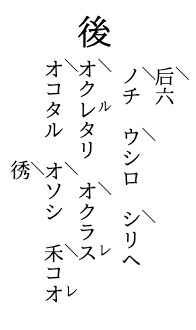
The Kunten Materials Style File kunten2e.sty
#
Having come this far, upon looking at TeX files created around 2005, redefining
everything with newcommand started to become tedious.
Since the files from around 2005 use Kinsui Satoshi’s kunten2e.sty, an attempt
was made to make the commands usable as-is.
It appears that using Kinsui Satoshi’s kunten2e.sty with LuaLaTeX requires some
modifications.
The following changes were made.
\kanjiskip --> \ltjgetparameter{kanjiskip}
\xkanjiskip --> \ltjgetparameter{xkanjiskip}
zw --> \zw
zh --> \zh
There may be other places that need modification, but this will do for now.
The file name was changed to kunten2e-lua.sty.
The following change was also made in sfkanbun.sty.
\nointerlineskip --> \par\nointerlineskip
There is no corresponding location in kunten2e.sty.